Sunday, 20 May 2012

How to watch age restricted videos on youtube without an account

Youtube is the most popular video streaming website. YouTube has thousands of streaming videos on nearly every topic. Which are  free to watch.Certain videos that contain nudity, explicit, or violence content are put under 18+ category and you can’t watch these videos on YouTube unless you are logged into your YouTube / Google account.In this post I will show you a simple hack on how to see those videos icon wink How To Watch 18+ Adult Videos on YouTube Without Logging In

1>Right click on the video and copy the link address of that video

2>Paste the copied url in the address bar of your browser

3>The url will be in this form http://www.youtube.com/watch?v=VIDEOID

4>Remove "watch?" and "=" from the url and add " / " after v.

5>After editing the url will be in the form http://www.youtube.com/v/VIDEOID


The video will be shown directly on the website.  No downloading necesssary.

Thursday, 17 May 2012

Trick to Know Who’s Online While You’re Offline on Facebook


 Using this simple trick you can overcome this facebbook limitation in seconds.
> Go to search bar of fb and type ‘online now’ and click on first link. Next click ‘allow’ that’s it you’ll get a list of all your available friends on facebook chat.
Have Fun!!

How to change your IP address without using any software


For those who don’t know what an IP address is, its a unique number of your Computer when connected to internet. Every single gadget that connects to internet has its own unique ip address. Any other computer/website/tool can easily trace your location using this ip address. To know your ip address go to whatismyip.com. So if you’re upto something mischievous online, you better should change your IP before that. Here’s how to do it.

Windows XP/Vista/7/8:

> Go to Start and type cmd in search, click on cmd & it’ll open command prompt. In case of XP click on run, type cmd and press enter.
> Copy paste ipconfig/release in the window and press enter. Later copy pasteipconfig/renew and enter again. Type exit and press enter.
That’s it you computer will have a new IP address. Have Fun!!
Tip:Copy paste your original IP before changing IP address.
Warning:Changing IP address may reduce your computer speed.

Google Easter Eggs-Part 1

Zerg Rush 
Search Google for Zerg Rush and you will see the O's of Google attacking the search results page. They will attacking every result one by one. There is a health bar which indicates how injured a search result is. You can also kill these O's by clicking on them. They also have health bars which indicates their health. You get points on the basis of how many O's you kill. The aim of this game is to beat as many O's as possible.

Zerg Rush Google Easter Egg

Askew or Tilt
Ever had the chance of searching Google for Askew or Tilt? If you have, then you already know what comes up. If you haven't, do it now and you will see the search results page literally tilt to give you a better idea of what these words mean. This will work only if you use latest browsers which support HTML5 and CSS3. So, Internet Explorer users, use Firefox, Google Chrome or Safari for a while to use this.

Do a barrel roll
Google Tricks & Easter Eggs
'Do a barrel roll' in its true sense means to do a 360 degree spin. Google takes practical demonstrations way too seriously for this one and literally spins the search results page to give you a clearer idea of the meaning of this phrase. Don't believe me? Go search Google for Do a barrel roll now and see your world turn around.

Binary, Octal and Hexadecimal Number systems
Another one of those literal Google Easter eggs. If you search Google for "Binary", "Octal" or"Hexadecimal" (without quotes) with Search Plus Your World disabled, Google will show the number of results in the same number system. For example, searching Google for hexadecimal will return the number of results like in the image below.

Octal, Binary & Hexadecimal

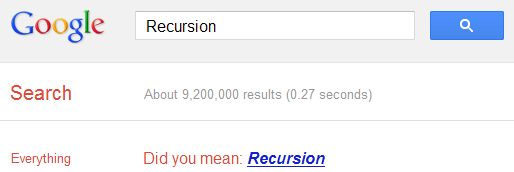
Recursion
The "Did you mean?" feature of Google often helps many users to get to the right results when they type something different from what they intended to search. If you search Google for recursion, the same feature takes you to an endless loop of clicks all linking to the same results page thereby completing recursion, which occurs when something calls itself. Seriously geeky.

Recursion Google Easter egg

How to make your computer welcome you


With this trick, you can make your Computer welcome you in its computerized voice. You can make your Windows based computer say "Welcome to your PC, Username."

Make Windows Greet you with a Custom Voice Message at Startup

To use this trick, follow the instructions given below:-

  1. Click on Start. Navigate to All Programs, Accessories and Notepad.
  2. Copy and paste the exact code given below.
Dim speaks, speech
speaks="Welcome to your PC, Username"
Set speech=CreateObject("sapi.spvoice")
speech.Speak speaks
     3.  Replace Username with your own name.
     4.  Click on File Menu, Save As, select All Types in Save as Type option, and save the file as Welcome.vbs or "*.vbs".
     5.  Copy the saved file.
     6.  Navigate to C:\Documents and Settings\All Users\Start Menu\Programs\Startup (in Windows XP) or to C:\Users\ User-Name\AppData\Roaming\Microsoft\Windows\Start Menu\Programs\Startup (in Windows 7 and Windows Vista) if C: is your System drive.
     7.  Paste the file.

 Make your Computer Welcome you at startup

Now when the next time you start your computer, Windows will welcome you in its own computerized voice.

Note: For best results, it is recommended to change sound scheme to No Sounds.
You can change the sound scheme to No Sounds by following the steps given below:-
  1. Go to Control Panel.
  2. Then click on Switch to Classic View.
  3. Then Click on Sounds and Audio Devices.
  4. Then Click on the Sounds Tab.
  5. Select No Sounds from the Sound Scheme option.
  6. If you wish to save your Previous Sound Scheme, you can save it by clicking Yes in the popup menu.
  7. Click on OK.
Change Sound Scheme to No Sounds

Try it yourself to see how it works. In my personal opinion, this is an excellent trick. Whenever I start my PC in front of anybody and the PC welcomes me, the fellow is left wondering how brilliant a computer do I have.

How to change facebook login page


Here is the trick:

1> Install FB Refresh extention for your browser from here

2> If you’re done with above step got to Settings >> Tools >> Extensions and click on “Options” menu. Put URL of image which you want as a background for Facebook Login page (upload your image to image hosting sites like freeimagehosting.net etc to get a image url or you can copy image url's from google image search).

tip:find a larger image to fit the whole screen.

How to remove timeline from facebook


1>Go to TimeLineRemove.  Depending on your browser you’ll see the icon of your respective browser flashing.

2>  click on it and install the extension/add-on.

3> Now restart your browser and check your Facebook profile page, Facebook timeline has been removed.

Tip:If you want to get back to facebook timeline, just simply uninstal or disable the TimeLineRemove from the add-on/extension tab in options of your respective browser .